top of page

How to use DutyMan
Yes - we know it's ugly and difficult to use (sorry!).
Hopefully that will change soon.
Step 1 - Login
Click this Link To Open DutyMan
You should then see a screen with the following on the right hand side.
Enter the same email address that you use in the Member Mojo membership form and click the green arrow. (you don't need a password)
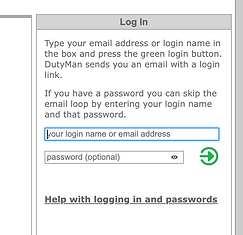
You will be sent an email with a link to login to DutyMan. After following the link you should see something like the image below.
Dutyman may open on a different page, in which case click the "Calendar View" tab on the far left.

Follow the red links to see your assigned duties.
You can then use the buttons on the right hand side to either "Confirm your Duty" or "Request a Duty Swap"
bottom of page